How to Turn Off Auto Rotation on Your DSLR Camera
If your captured image appears rotated when using your DSLR camera, you may need to disable the auto-rotation feature.
Steps to Disable Auto Rotation
Open the Camera Settings
- Access the settings menu on your DSLR camera.
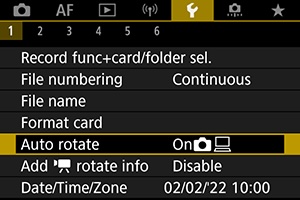
Locate the 'Auto Rotate' Setting
- Find the option labeled 'Auto Rotate' or similar.
Turn Off Auto Rotation
- Change the setting to 'Off' to disable auto-rotation.